OFFICIAL EAGLEGUARD BUILT FOR YOUR NEXT OUTINGHow to use
See all models
YOUR PRODUCT GUIDE

EG-007Pro

BLUETOOTH · USB-C · Model No. E2850

Download PDF English · 4 pages · 3.9 MB
01 / MEET YOUR GEAR

Know the controls.

Take a closer look. Match the numbered parts to the descriptions below each view.

Go to setup
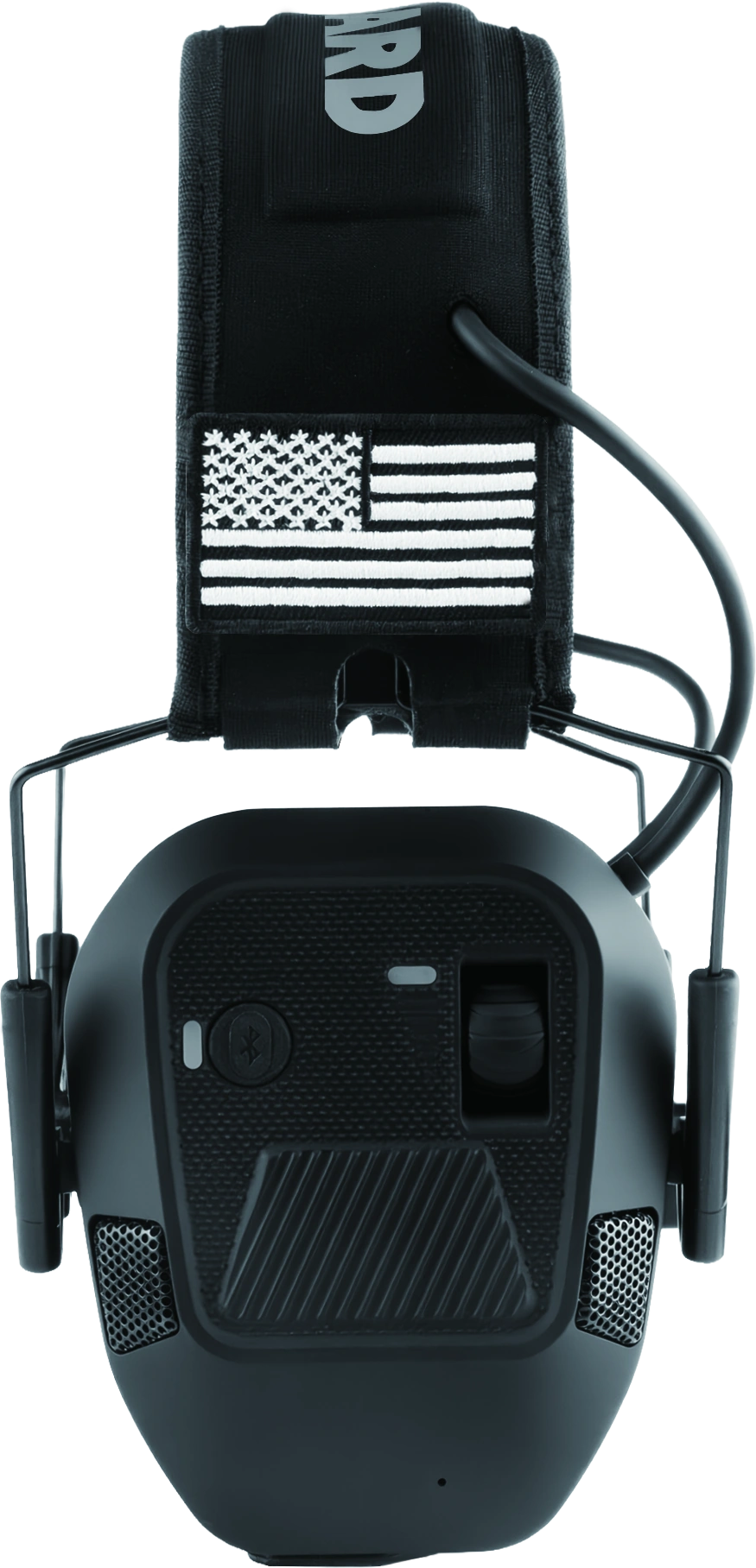
EG-007Pro controls-side view; numbered parts are described below
VIEW 01 / CONTROLS-SIDE

Controls & connections.

01 Power & ambient volume
Use the control knob to switch the earmuffs on and adjust the ambient sound. Start at a low volume.
02 Bluetooth button
With the earmuffs powered on, hold this button for 5 seconds to enter Bluetooth pairing mode.
03 Microphones
Four microphones are positioned across the two earcups. The grille shown here is one of the microphone locations.
04 Hook-and-loop patch panel
The panel on the headband holds the removable patches supplied with your product.
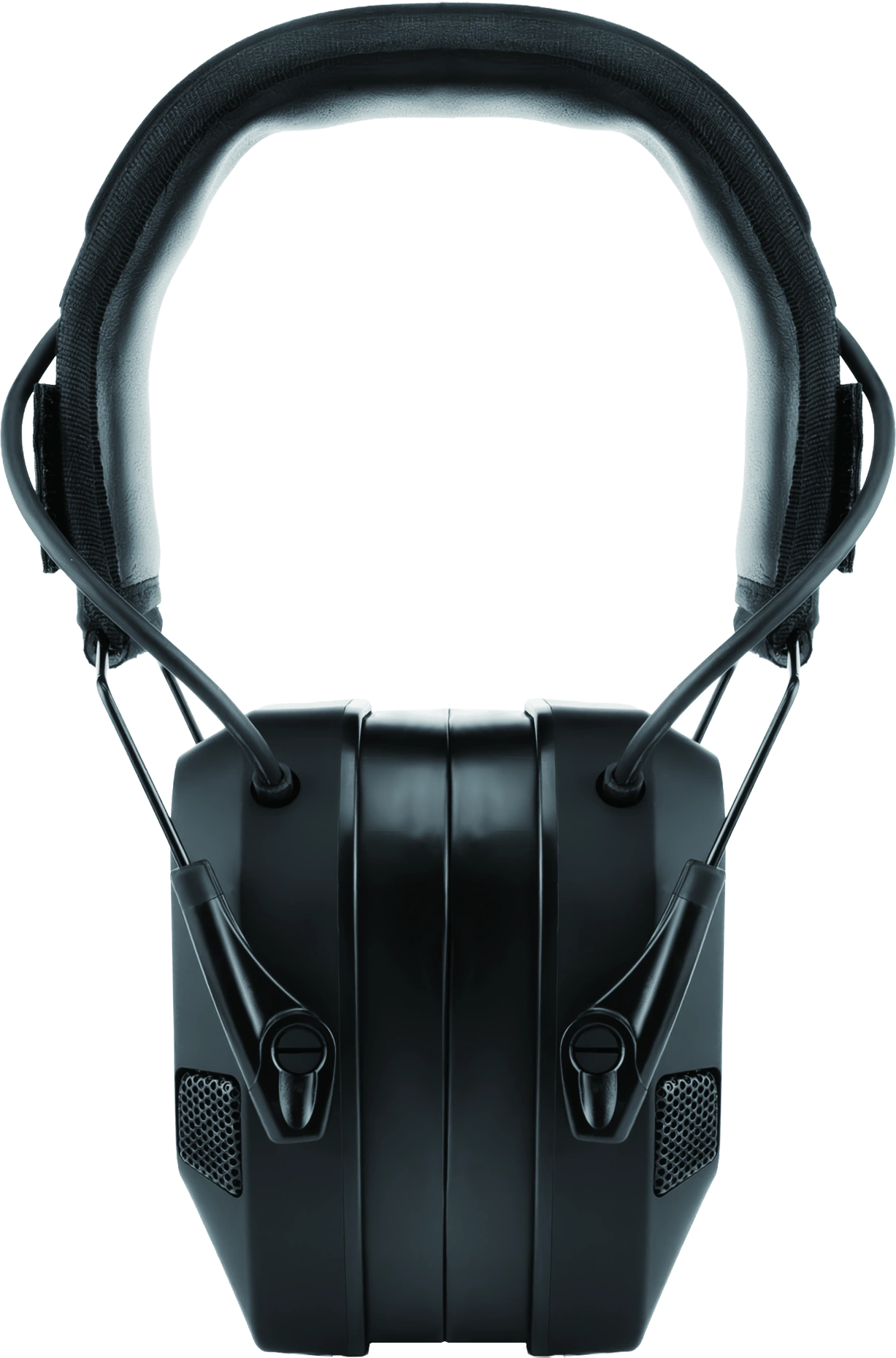
EG-007Pro headband and cushion view; numbered parts are described below
VIEW 02 / HEADBAND AND CUSHION

Find your fit.

05 Padded headband
Place the padded headband over the top of your head.
06 Headband adjustment
Adjust the earcups along the supports until both ears are fully covered and the headband sits securely.
07 Soft gel ear cushions
The cushions should surround both ears evenly. Check for gaps caused by hair, headwear or eyeglass arms.

Photographs from the supplied EG-007Pro guide. Patch styles may vary by product version.1

02 / START HERE

Get ready, step by step.

Follow the steps for the model printed on your product.

  1. 01

    Charge through USB-C

    Locate the USB-C charging port shown in the diagram and use the supplied USB-C cable. The indicator stays red while charging and changes to steady blue when fully charged. Keep the product and port dry.

  2. 02

    Adjust the fit

    Gently separate the earcups, place the padded headband over your head and adjust the earcups until they fully cover both ears. The cushions should sit evenly against your head.

  3. 03

    Check the cushion seal

    Make sure the cushions form a snug seal. Keep hair and clothing clear of the cushions. Glasses must not break the seal. Recheck the fit when you add other head-worn equipment.

  4. 04

    Turn on and set your volume

    Turn on the earmuffs using the knob on the right. The power indicator turns green. Start with a low volume, then adjust the ambient sound to a comfortable level.

03 / CONNECT YOUR AUDIO

Pair with Bluetooth.

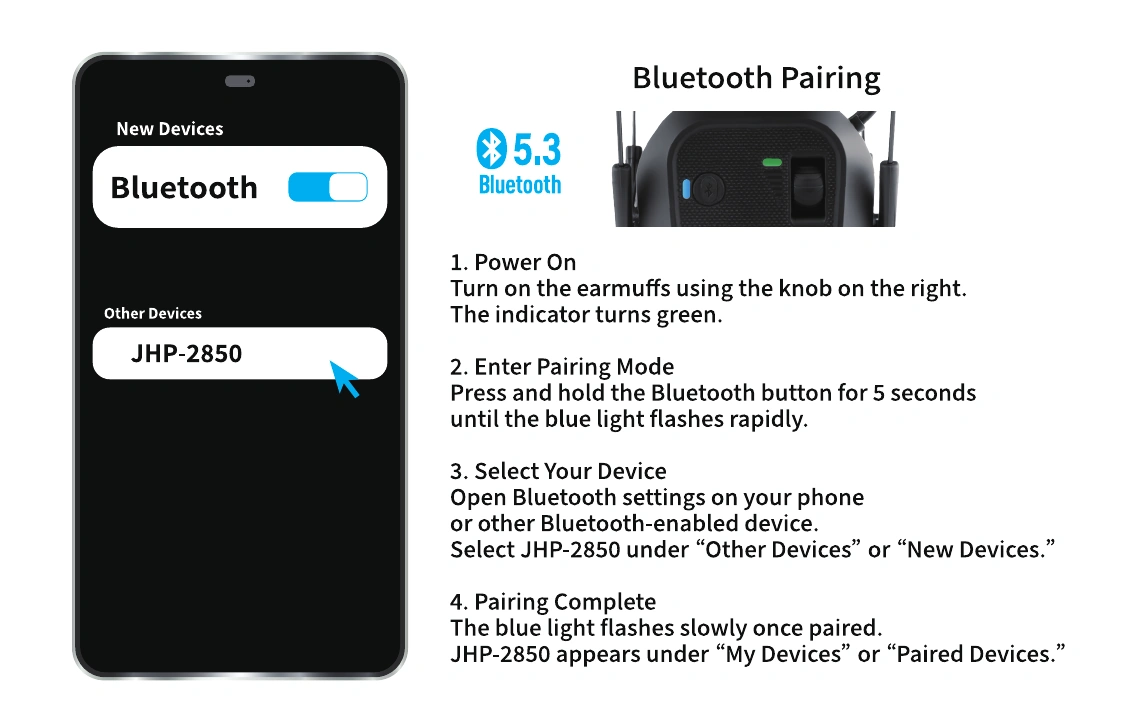
LOOK FOR THIS DEVICE NAMEJHP-2850Bluetooth pairing illustration showing JHP-2850 in a phone device list and the Bluetooth button
The phone menu shown in the guide is illustrative. Menu wording may vary by device.
  1. 01

    Power on

    Turn on the earmuffs with the knob on the right. Look for the green power indicator.

  2. 02

    Enter pairing mode

    Press and hold the Bluetooth button for 5 seconds, until the blue light flashes rapidly.

  3. 03

    Choose JHP-2850

    Open Bluetooth settings on your phone or other compatible device. Under “Other Devices” or “New Devices”, select JHP-2850.

  4. 04

    Confirm the connection

    The blue light flashes slowly once paired. Your device should list JHP-2850 under “My Devices” or “Paired Devices”.

USB-C is for charging.

This model uses Bluetooth for its audio connection and does not have the standard model’s 3.5 mm AUX input.

BEFORE EVERY USE

Safety notice

Wearing instructions & care

These earmuffs reduce noise but do not block all sound or eliminate the risk of hearing damage. Actual protection depends on proper fit, product condition, noise level, and exposure time.

For shooting or very loud noise, wear properly fitted earplugs under the earmuffs. Stay alert, as hearing protection may make warning signals harder to hear.

For children, choose an appropriately sized model and use only under adult supervision. Make sure the cushions fully cover both ears and form a snug seal.

Product features and specifications may vary by model and region.

Actual product performance may vary depending on usage conditions and environment.

04 / BETWEEN OUTINGS

Keep your gear ready.

POWER

Switch off after use.

Use the power knob to turn off the earmuffs when you finish. Before your next outing, check the charge and inspect the cushions and headband.

CARE

Clean gently.

Wipe clean with a soft, damp cloth. Allow to dry before storing. Check before each use. Do not use if the earcups, cushions, or headband are damaged. Do not immerse the earmuffs in water. Keep the product away from excessive heat and open flame, as stated in the supplied guide.

CHECK

Pay attention to changes.

If a cushion is damaged, a secure seal cannot be achieved, or the product makes abnormal sounds, stop using the affected product and seek product assistance.

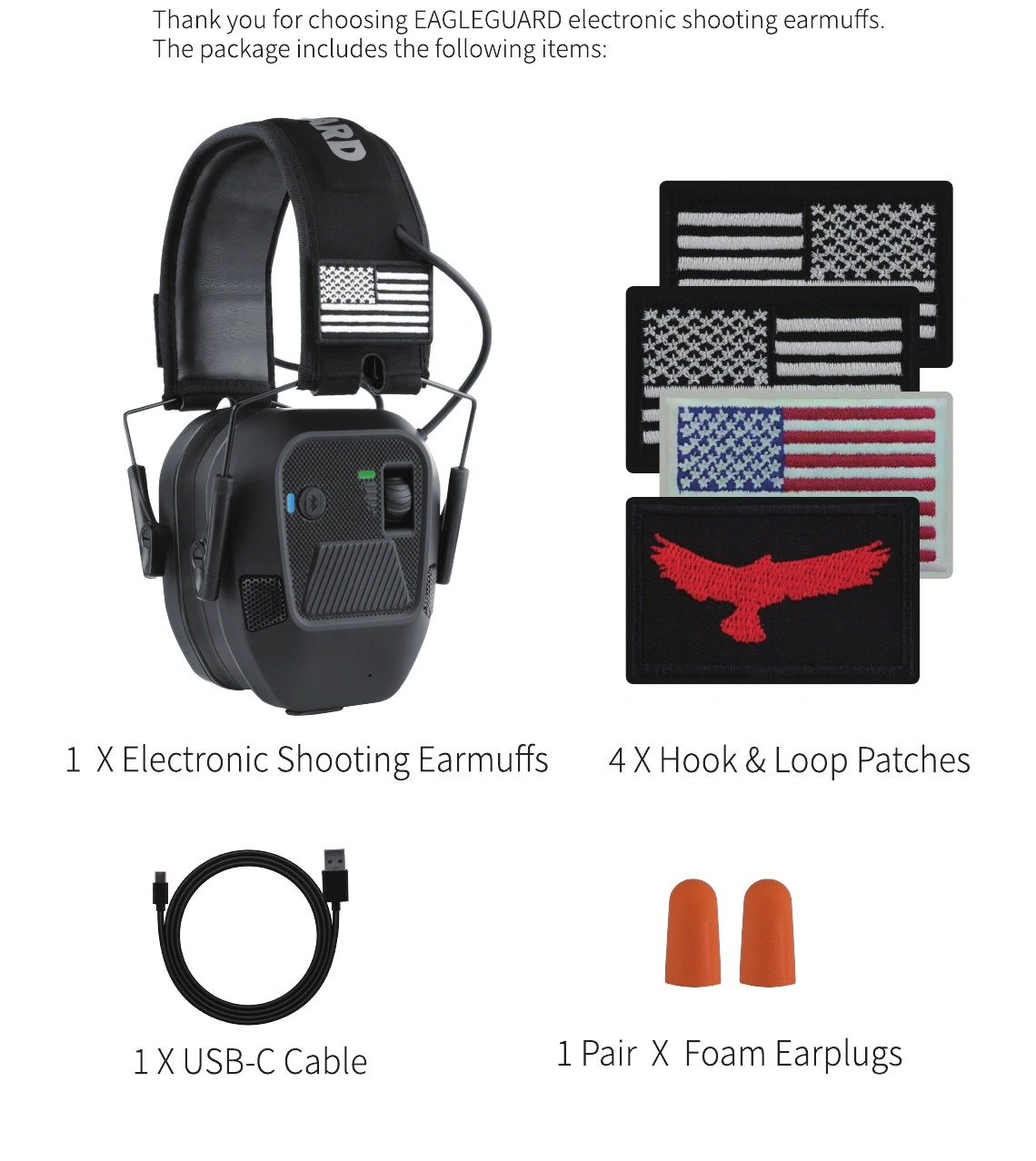
What is shown in the box?
Package contents illustrated in the EG-007Pro guide
Earmuffs
1 electronic shooting earmuff
Audio / power cable
1 USB-C cable
Accessories shown
4 hook-and-loop patches and 1 pair of foam earplugs

Included accessories and patch styles may vary with product version and production batch. Check the contents supplied with your own product.

05 / QUICK ANSWERS

A few things worth knowing.

The earmuffs will not power on. What should I check?

Check the battery charge and the power knob. The USB-C charging port is shown in the controls diagram above. If the product still will not switch on, seek product assistance.

Why does the Bluetooth name say JHP-2850?

JHP-2850 is the Bluetooth pairing name printed in the supplied EG-007Pro guide. Select that name when connecting your device.

My phone cannot find the earmuffs. What should I do?

Make sure the earmuffs are powered on. Hold the Bluetooth button for 5 seconds and confirm that the blue light flashes rapidly, then look for JHP-2850 in the phone’s Bluetooth settings.

How do I know pairing worked?

The blue light flashes slowly after pairing. JHP-2850 should appear in the paired or connected device list.

What do the charging lights mean?

The indicator stays red while charging. When the battery is fully charged, it changes to steady blue. During Bluetooth pairing the blue light flashes rapidly, and after pairing it flashes slowly.

Why are the earmuffs beeping?

Repeated beeps are the low-battery warning. This warning does not cause an indicator-light change. Recharge the earmuffs through the USB-C charging port.

Do I need an account or an order number for this guide?

No. You can read the guide and download the PDF without creating an account or entering order information.

06 / KEEP A COPY

The guide, ready to go.

EG-007Pro · English · 4 pages · 3.9 MB

Original quick start guide, split into individual reading-order pages. Includes Bluetooth pairing instructions. Version: V20261016-EG-007Pro-E2850.2

A LITTLE MORE HELP

Any Questions?

Start with what you need.

Using your earmuffs

Find controls, setup steps, audio connections and troubleshooting in the guide for your model. For individual assistance with a purchased item, use the product-contact option provided by your retailer.

Read model FAQs
Returns, replacements or delivery

For returns, refunds, replacements or delivery questions, contact the retailer where you purchased the product and use that retailer’s order-support process.

If you purchased on Amazon, open your order to find the available support options.

Amazon Your Orders

No account or order number is needed to read the guides or download a PDF.